I’ve been watching Cerakey’s products for a while. The sheer idea of mechanical keyboard caps being made out of ceramic sounds intriguing.
The stock caps on the Keychron K6 I use at the office or when traveling haven’t been doing well for a while:
- Multiple keys’ paint started coming off. Less of an issue for finding the keys (I know where they are), more of an aesthetic issue.
- The G key’s switch stem broke off and got stuck in the G key cap. After failing to extract the broken part from the cap, the cap was essentially lost and I replaced it with a generic translucent cap from a switch tester.
Just look at the poor mutilated boy: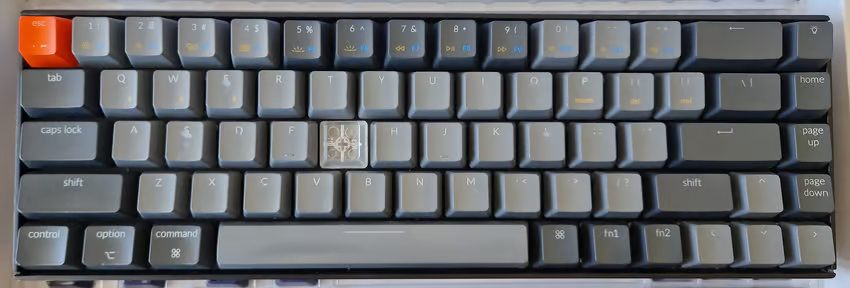
None of these are functional issues, but aesthetics are worth something too. Plus, I could no longer contain my curiosity about what heavy ceramic caps sound like in real life, so I asked my lovely wife for a birthday present.
It’s worth noting at this point that neither myself, nor the gift giver were sponsored by Cerakey, so this is my honest, non-bribed opinion.
Scope of the package🔗
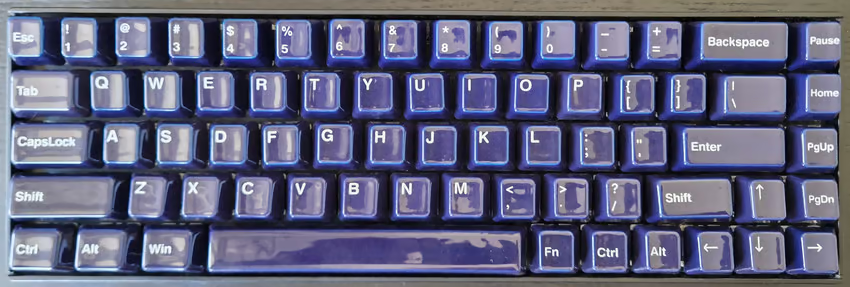
I got a full set of Indigo caps. Not my usual color, but they look so damn beautiful!
The package shipped from China in less than 48 hours and arrived 8 days later in Austria (with no customs payment required). It came with:
- 114 keys, including some redundant ones (e.g. paging keys) to accommodate different keyboard layouts that have these keys in different rows, requiring different profiles.
- A key puller with one side for pulling caps, and one for pulling switches.
- A dummy switch (no idea what it’s for).
- A real Kailh dark yellow switch with 70 g spring resistance.
I found the addition of the real switch a bit weird, but hey - who says no to a “free” switch? It all made sense during install.
Swapping out the keys🔗
The process was the same as with any cap set, but when testing, I noticed that the space bar was much slower to move back up after pressing than other keys. That seemed quite plausible due to the weight of the key and by low 55 g resistance of my MX Brown switches. After some more typing, I even had a few cases of space being triggered repeatedly.
As confirmed by the Cerakey FAQ page, the extra switch with its strong spring is included for the extra heavy space bar. I had previously used some other Cherry switches from my collection, but the one that came with the caps worked best.
My only gripe with the included switch is that it’s linear rather than tactile (the MX Brown switches on the rest of the board are tactile), but it’s not a big issue, because I like smacking my space bar with some force.
The looks🔗
To quote George Takei:
Oh my.
The glossy Indigo is stunning. It goes well with the black bezel of the board, but might look even better with a white bezel (I could try printing one) to evoke the feeling of Dutch Delftware. The picture above doesn’t do their true appearance justice due to the reflections on the surface. In reality, the blue is much deeper and a strong contrast to the legends.
Talking about legends: If you look closely, some of them look a bit crooked, and if you look even more closely, you notice it’s not the legends, but the keys themselves.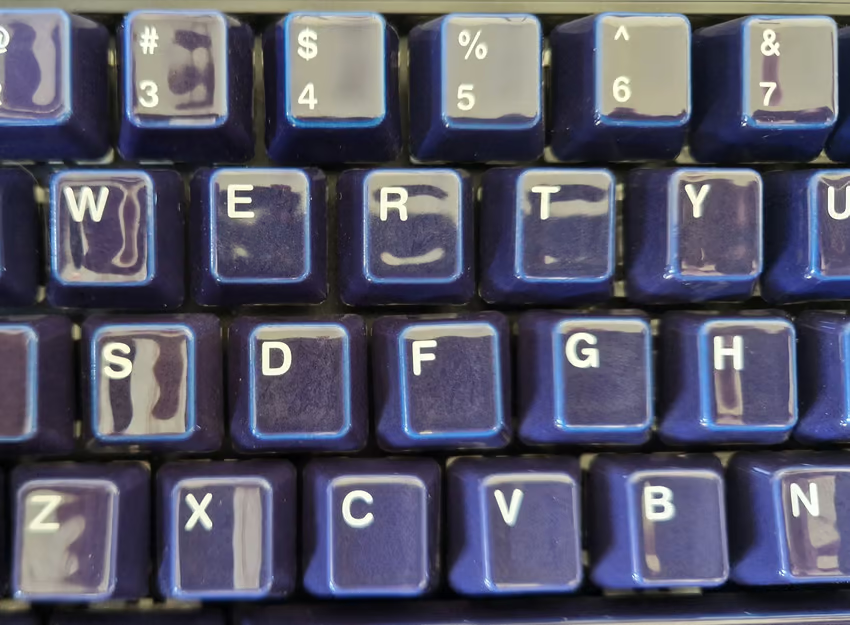
This probably has to do with the cap stems being made of ABS and glued into the ceramic cap body.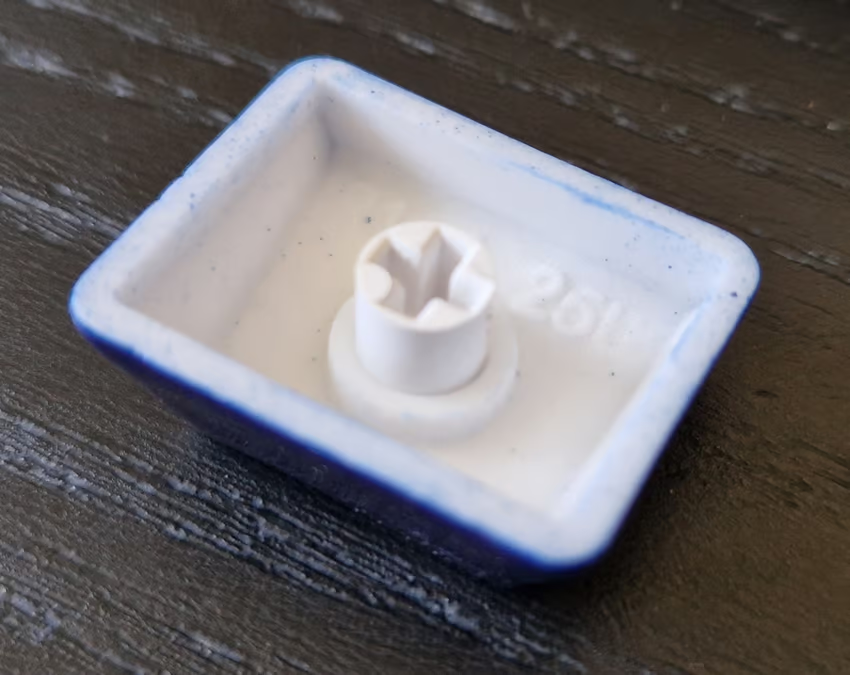
The stem is at the same time delicate and under heavy mechanic stress when typing, so it’s reasonable that this turned out to be hard to manufacture entirely in ceramic, especially considering how the cooling process can affect shape accuracy.
In practice, I don’t notice, so I don’t mind, but it’s the detail that’s missing for a five star rating - more like 4.8 now.
Earlier, I mentioned that some keys were included multiple times with different profiles to accommodate as many layouts as possible. This didn’t work out fully for me, because there was no home key with a suitable profile to go into the second row. The rightmost column on the Keychron K6 is (from top to bottom) lights, home, page up, page down, right arrow, so I ended up using a top row home key in the second row.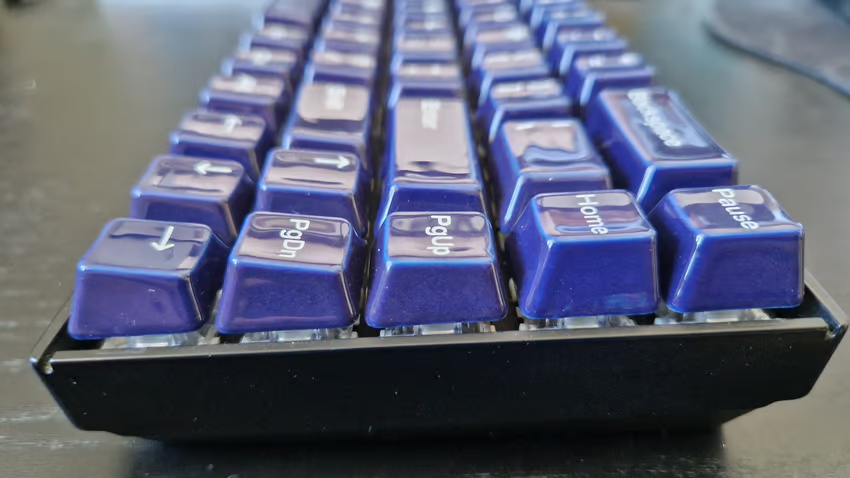
That’s on me - I could have checked that and decided against the set (or used non-labeled keys for more flexibility), but again this is something that hardly matters in practice.
The sound🔗
It’s really hard to describe such sounds, so bear with me. The new caps sound deeper than regular plastic ones, and are a bit louder. There is a softness to the noise, as if the key briefly sucked up to the base plate before releasing again with a barely audible “plop” (although that’s not happening).
It’s certainly a nice, non-distracting sound. Nonetheless, I’ll have to check with my office mates to see if the noise level is still acceptable, but they didn’t even mind an IBM Model M, so it’s probably going to be fine.
The feel🔗
The slick cap surface feels nice. As the weather gets hotter, I wonder how this will feel with slightly sweaty hands - could be good or bad. The ceramic’s high heat capacity keeps the keys nice and cool, which could be great in summer.
Otherwise, the typing feel doesn’t change immensely. The caps’ biggest impact is on noise and looks. If there is a difference, it’s probably the keys going a bit faster now due to the extra weight, so it’s like the switches suddenly had softer springs.
Conclusion🔗
Ceramic caps are a great upgrade if you like the sound and can compromise a little on the space bar switch. Just make sure you have a keyboard with hot-swappable switches (unless you’re not afraid to use a soldering iron).
The optics are absolutely stunning and the feel is great. A clear upgrade, even if my old caps hadn’t been busted already. I might get more of these for some of my other keyboards.