At some random point in the past few weeks, Ethernet speed on my couch dropped from just under 1 Gbit/s to less than 100 Mbit/s. Besides feeling like I was back in the early 00s, this frustratingly ruined my low latency streaming performance.
I had made no changes to any network equipment or clients on the route (yes, that’s what they all say), so this was genuinely baffling.
It was possible to cope for a while by lowering stream bandwidth in Moonlight, but that wasn’t a great experience.
Spoiler alert: There is no satisfying root cause discovery and conclusion. I'm just venting and reinforcing the importance narrowing down problem site before deep-diving into looking for the cause.
Network layout🔗
I live in a rental apartment that was originally built in the 1950s, so there was zero existing network infrastructure to use, and my options to make changes are severely limited, because I have to undo everything when moving out. As such, the network is set up less ideal than I would have under perfect circumstances.
The big picture of the network looks roughly like this, all connected
                                                              +---------------+
                                                              | Stream client |
                                                              +--------+------+
                                                                       |
+---------------+   +-------------+   +--------------------+   +-------+------+
| Stream target |---| Rack switch |---| Living room switch |---| Couch switch |
+---------------+   +------+------+   +--------------------+   +--------------+
                           |
                       +---+----+   +-------+   +----------+
                       | Router |---| Modem |---| Internet |
                       +--------+   +-------+   +----------+
Everything is wired up with CAT7 cables.
It’s worth mentioning that I initially experienced this issue on my couch device, which has no Ethernet on its own, so I was using a USB-C dock with known-to-work ethernet support.
Troubleshooting steps🔗
I tried these, not necessarily in that order, with no change to measured performance, using iperf3 between the couch and my rack to measure:
- Swap out various Ethernet cables I still had lying around (old and used; suspecting wire damage).
- Buy new, high quality Ethernet cables.
- Cycle through different ports on the couch switch.
- Test with Windows (using WSL to run
iperf3) to rule out OS driver issues. - Try to find a Windows-native
iperf3alternative to rule out WSL interference (they all look dodgy). - Try built-in Gigabit Ethernet with a different device.
- Buy a new USB-C dock with a different chipset to rule out dock damage and driver issues.
- Install
iperf3daemons on most of my fleet to see if my speed test target had been the bottleneck all along.- I missed a signal here: All devices that make good
iperf3servers are located in the rack, attached directly to the rack switch, so I should have been able to tell that the problem lies on the route from rack switch to stream client.
- I missed a signal here: All devices that make good
- Use
ethtoolto disable various Ethernet features that could cause performance issues. - Disabled USB power saving features that would have caused issues with some USB network peripherals a few years back.
- Gaslit myself into believing that I might have been on 100 Mbit/s all along because of hardware incompatibility.
- Fought the gaslighting by verifying specs and USB transfer rates with
lsusb -t. - Verified the configuration of the couch switch.
- Failed to verify the configuration of the living room switch, because I had lost the password.
- (Un)fortunately, it wasn’t
admin:admin.
- (Un)fortunately, it wasn’t
- Connected directly to the living room switch to see if the couch switch was the problem (no, it wasn’t).
- Connected directly to the rack switch to see if the living room switch was the problem (yes, it was!).
How stupid of me not to do that in the first place to locate the site of the problem! Instead, I had focused on the client, because traditionally, that’s where things went wrong, because that’s where the bulk of complexity lies.
Not being able to check the switch settings should have raised eyebrows, but my wife was actively using that part of the network while I investigated the living room switch at first, so I didn’t want to cause an outage by resetting it. By the time she was done, my attention had already moved on.
Solution🔗
At this point, even LLMs started running in circles, and I was about to succumb to despair when I remembered that I still hadn’t ruled out whether the living room switch or the cable between it and the rack switch could be the problem.
To be able to run the cable through my whole apartment, using door caps as makeshift ducts, I used a flat one, which are more prone to breaking than round cables. Prime suspect for reliability issues (although the lack of packet loss contradicts such a suspicion).
To validate whether the cable is the problem, I’d have to disconnect the living room switch and everything attached to it from the rest of the network briefly. If I’m going to have an outage, might as well reset the switch so I can set a new password and rule out issues with the switch.
The switch factory reset came first, and - lo and behold - iperf3 immediately measured just under 1 GBit/s on the living room switch itself, as well as all downstream equipment.
Root cause guess🔗
The living room switch supports per-interface speed limits:
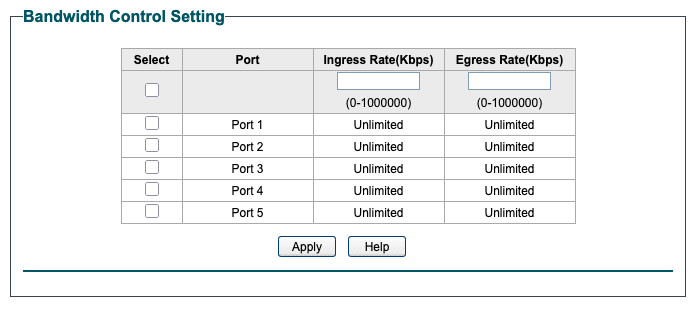
My best guess is that I experimented with that settings once and forgot about undoing the changes.
If I was more paranoid, I’d blame the CIA breaking into my net and messing with me, but I’m not nearly interesting or schizophrenic enough to receive that kind of attention.
Learnings🔗
Should my suspicions be correct, I should separate the stuff I’m messing with from my “production” infrastructure, or at least do a better job rolling back my experiments.
I looked into automatic provisioning of managed switches as well, e.g. using Ansible, but cheap TP-Link switches aren’t very susceptible to automation.
My leisure time trouble shooting process can definitely learn something from how I do things at work, where I typically place greater emphasis on isolating the location of the problem before attempting solutions.
March 2026 update: It kept happening🔗
Mid gaming session, even, which is noticeable, because the stream at my preferred quality settings can’t keep up if the link speeds drops from 1000 to 100 MBit/s.
The switch control panel showed the “trunk” Ethernet cable (the flat one mentioned earlier) to use only 100 Mbit/s. I could disable the link in the control panel, and turn it back on, upon which it would resume 1000 Mbit/s operation… for a while. That while could be minutes, hours, or weeks.
So now I can be pretty certain that it’s the wire’s fault. Replacing it is going to be a pain, but better than an enduring mystery.