Frigate is probably the most comprehensive FOSS video surveillance solution out there. It comes with rich entity detection support using relatively small neural nets, and supports various hardware acceleration strategies out of the box, as well as sporting first-class support of energy efficient single board PCs like the Raspberry Pi.
Although entity detection can run on the CPU as well, it’s quite taxing and doesn’t scale well past a few cameras, even on a Raspberry Pi 5 (which I’m using to keep power consumption low). Frigate’s docs are pretty clear that running detection on CPU is for testing only, and productive use requires a GPU or some other means of acceleration.
Acceleration options for the Pi 5: Google Coral🔗
The golden child for detection on Frigate used to be Google Coral, a Tensor Processing Unit (TPU), as uses by Google in its own data centers for AI stuff, for “edge” use. Unfortunately, Google doesn’t really care about it anymore, resulting in lapsing driver updates that fall behind with Linux kernel development.
I could only get the driver to work with manual patching of the source to be compatible with a modern kernel on Debian Trixie, and still caused more problems, so I cut my losses and moved on.
The new(er) kid on the block: Hailo🔗
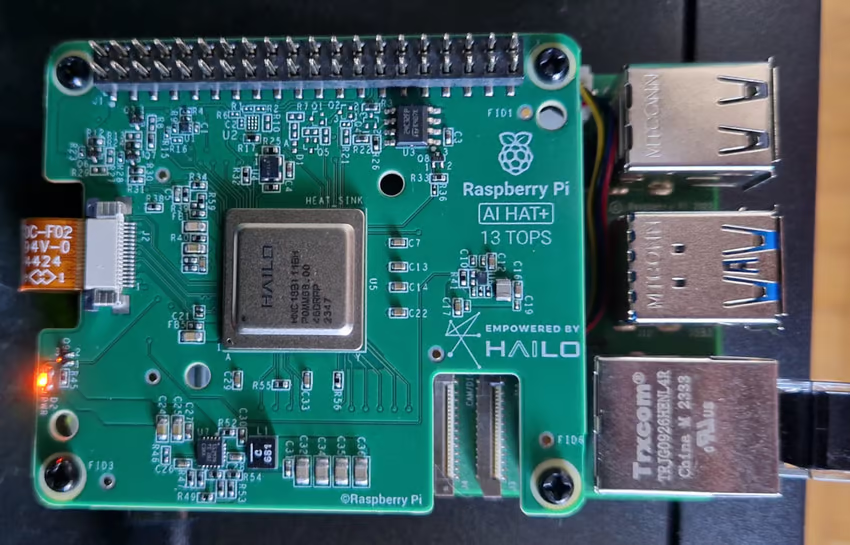
The Raspberry Pi company sells official Hardware Attached on Top (HAT) devices with a Hailo accelerator offering 13 or 26 TOPS (depending on variation). Being an official product, it should be easier to integrate with the official OS, right? Right?
*laughs in Docker*
Frigate image compatibility🔗
Frigate is recommended to run in Docker, which also makes tinkering very safe, because it’s easy to go back to a known good state without nuking the host OS.
The problem is that the Frigate build bakes a specific version of the Hailo userland libraries into the image. The Hailo userland version must match up exactly with the driver version, but the driver version is decided by the host OS.
The Hailo driver shipped with Raspberry Pi’s Debian Trixie repository is 4.23.0, whereas the Frigate userland is 4.21.0. The Frigate project uses a specific version on purpose to ensure compatibility with Home Assistant when run as a Home Assistant addon, but that basically blocks Hailo use on any system that uses a different driver version.
Non-solutions🔗
In an attempt to save time, I wasted a lot of time with alternative approaches. The silliest one is worth mentioning: Mounting the host system userland libraries in the container.
I added volumes like these to docker-compose.yml so host and container versions woult match:
    volumes:
      - /usr/lib/libhailort.so.4.23.0:/usr/local/lib/libhailort.so.4.23.0:ro
      - /usr/lib/libhailort.so:/usr/local/lib/libhailort.so:ro
      - /usr/lib/python3/dist-packages/hailo_platform:/usr/local/lib/python3.11/dist-packages/hailo_platform:ro
      - /usr/bin/hailo:/usr/local/bin/hailo:ro
      - /usr/bin/hailortcli:/usr/local/bin/hailortcli:ro
Also made sure to include the Python C bindings so any foreign function interfaces that might have changed between 4.21.0 and 4.23.0 still match up.
That failed because the shared object libraries depended on specific versions of other libraries on their own, so things failed in new exciting ways.
Building my own Frigate image🔗
Modifying the Hailo userland version installed by the container image build and building a fresh image ultimately did the trick.
The actual code change was as easy as that:
diff --git a/docker/main/install_hailort.sh b/docker/main/install_hailort.sh
index 2e568a14..93162e34 100755
--- a/docker/main/install_hailort.sh
+++ b/docker/main/install_hailort.sh
@@ -2,7 +2,7 @@

 set -euxo pipefail

-hailo_version="4.21.0"
+hailo_version="4.23.0"

 if [[ "${TARGETARCH}" == "amd64" ]]; then
     arch="x86_64"
Building the image manually was a bit tricky to find out, because the process isn’t documented, but GitHub actions were somewhat revealing. In the end, the process looks like this:
- Check out the tag of the version you’re using - in my case:
git checkout v0.16.3 - Change the sources.
make version- This is really important, because it doesn’t happen automatically as part of the ARM build, and Frigate will refuse to start if the dynamically generated version module is missing.
make arm64
That resulted in an image tagged as ghcr.io/blakeblackshear/frigate:<git tag>-<git short hash>, ready for use in docker-compose.yml.
Conclusion🔗
Home Assistant, and by extension Frigate, will eventually bump the version to something more current, so this is hopefully just a temporary state of affairs, because manual patching and building makes updates more cumbersome.
I considered contributing customizability for the Hailo version at build time, but that would just complicate the build matrix just to cover this edge case.
Had I known ahead of time, I would have just put the upgrade to Trixie on hold until Frigate catches up. Oh well.
Speedup🔗
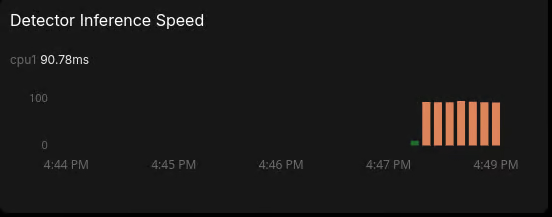
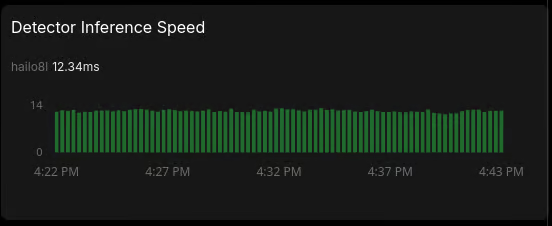
In the end, it was totally worth it, because the CPU is no longer permanently overloaded and can use its precious cycles for the work it does best, and inference is super fast.
With CPU:
With Hailo:
RPi HAT sandwiches also look really cool.
Configs🔗
For reference, here is the relevant part of my Frigate config:
detectors:
  hailo8l:
    type: hailo8l
    device: PCIe

# Hailo model config:
model:
  width: 320
  height: 320
  input_tensor: nhwc
  input_pixel_format: rgb
  input_dtype: int
  model_type: yolo-generic

objects:
  track:
    - person
    - cat # the only reason I'm doing this
  filters:
    cat:
      min_area: 500
      max_area: 100000
      threshold: 0.6

cameras:
  cameraname:
    enabled: true
    ffmpeg:
      hwaccel_args: preset-rpi-64-h264
      inputs:
        # Use high-res stream for native resolution recording to avoid transcoding overhead.
        - path: rtsp://camera/videoMain
          roles:
            - record
        # Use separate low-res stream for faster inference.
        - path: rtsp://camera/videoSub
          roles:
            - detect
    detect:
      enabled: true
      width: 320
      height: 180
      fps: 5
Also, parts of docker-compose.yml that were necessary to get this to work:
services:
  frigate:
    # Tag of the self-build image below
    image: ghcr.io/blakeblackshear/frigate:0.16.3-90344540
    # Specific capabilities instead of privileged mode
    cap_add:
      - CAP_PERFMON
      - CAP_SYS_NICE
    # Security options for device access
    security_opt:
      - apparmor=unconfined
    devices:
      # Video acceleration devices omitted - relevant for transcoding
      - /dev/hailo0:/dev/hailo0
    group_add:
      - "1001"  # ID of the group that owns /dev/hailo0 on the host
The device has a writable group in the host system, because I added this udev rule (the hailo group having ID 1001):
SUBSYSTEM=="hailo_chardev", MODE="0660", GROUP="hailo"March 2026 update: Frigate 0.17 supports Trixie out of the box🔗
With the most recent Frigate release, Hailo userland within the container image has been updated. Now you just need to run the user install script for Hailo drivers on the host system and you’re good to go. On a fresh Trixie install, that is.
I already had a tainted system from all my experiments, but didn’t want to start from scratch in case I needed to roll back to 0.16, so I had to manually remove the old Hailo driver version that was compatible with the old Frigate version before running the mentioned user install script.