Some recent office space restructuring enabled employees to take home certain now-unused pieces of equipment that the company would otherwise have to sell off or trash. I was lucky to get a Linksys LGS124 PoE-capable managed switch to simplify wiring in my rack at home.
Being able to power cycle devices remotely is really useful to get crashed/locked-up stuff to work again, but the switch web UI is a nightmare and borderline unusable on touch devices, which are sometimes the only available option on the go, so I looked into API options.
Ever heard of SNMP?🔗
An older coworker was mildly amused when I excitedly told him that I had disovered SNMP, a remote monitoring/management standard that dates back all the way to the 1980s - and my brand new used switch supporting it.
In a nutshell, SNMP identifies “objects” by a long object ID (OID) consisting of dot-delimited numbers. The objects are typed and structured as a tree. A suitable authenticated client can read these entities, and with some more privileges write to them to trigger changes in the SNMP server device.
Of course, Home Assistant has an integration for SNMP, so I could integrate the switch for easy PoE power cycling.
The struggle of finding the right OIDs🔗
Although SNMP is a standard, and parts of the object tree are standardized, PoE specifics are poorly specced and typically differ between vendors. I had to grep through the output of SNMP browsing tools and test out candidates to find the right object IDs. So, unless you have the exact same model of switch, the OIDs below will be useless to you.
However, vendors sometimes practice internal consistency, so if you have another Linksys managed switch, the information could be helpful.
Home Assistant integration for switching PoE power on specific ports🔗
Here’s the relevant config for switching one port - I added one such section for each PoE device:
switch:
  - platform: snmp
    name: my_poe_device
    host: 10.42.20.10
    community: private
    baseoid: 1.3.6.1.2.1.105.1.1.1.3.1.49
    payload_on: 1
    payload_off: 2
    version: '2c'
Let’s unwrap the less obvious bits:
host: <IP address>is necessary so the switch entity’s on/off state is derived from the network presence of the specified host. If this is omitted, Home Assistant tracks the entity state internally, so it might drift out of sync with the actual power state over time. The “perfect” solution would be to read back the power state via SNMP, but I wanted to keep things simple.communitymust match the name of the SNMP community that was created in the switch settings. It’s similar to a weak password.baseoidis the OID for the writable SNMP object that controls PoE power. Everything except the last number is the same for all PoE ports. The last number identifies the port, but it would be too easy if it was just the port number - it’s actually(port number) + 48. The example above controls the power of port 1.payload_on/payload_offtells Home Assistant which SNMP message to send when the switch is turned on/off. No idea why they picked1for off rather than0- probably because0is some reserved value.versionis the SNMP version used by the switch. Mine also supports version 3, which is more secure, but it was tricky enough to get version 2c to work, so I stuck with that.
Can we also read each port’s power use?🔗
That would be awesome, but not with this model. It doesn’t measure power per port, but it does measure overall PoE power use.
Reading that via SNMP is straightforward, once the right OID has been found:
sensor:
  - platform: snmp
    name: rack_switch_poe_watts_total
    host: 10.42.0.104
    community: private
    version: '2c'
    baseoid: "1.3.6.1.2.1.105.1.3.1.1.4.1"
    unit_of_measurement: "W"
    value_template: "{{ value | int }}"
scan_interval: 10Results🔗
I used standard intgrations for the PoE switch entities in one of my Home Assistant dashboards:
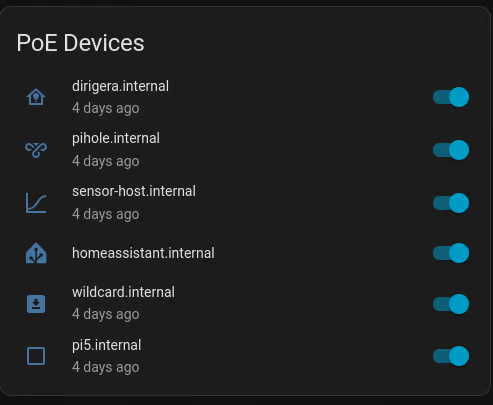
A small caveat of my approach is that the switch will still appear on for a bit after turning a device off, because network device discovery lags behind a little. Similarly, if the device is powered but offline for some reason, it will appear off althoug the power is on. I can still force the device to power cycle in all the cases by flipping the switch more than once.