A while ago, I wrote about VictoriaMetrics and, by extension, Grafana performing poorly, and placed the blame on NFS not being a good storage backend for most types of databases due to the requirement for reliable, granular, low-latency writes. While that’s objectively true, I didn’t use the database heavily enough for that to matter. It turned out that the problem was of entirely different nature all along.
First some background: The NAS that is used by many of my services for storage is limited to 1 GbE, but has two ports. Previously, I manually configured all NFS clients to use one of the two IP addresses associated with the NAS to spread out the load, which sucked and was far from perfectly balanced.
Then, I discovered link aggregation, which, in grossly oversimplified terms, allows bundling connections over multiple links between two peers into a single logical link with one MAC- and IP address. That way, all NFS clients can use the same host name or IP address and traffic balances over the available links.
This worked great for a while, until it didn’t. In the previous post, I moved the majority of I/O to local storage devices, only relying on the NAS for backups or tasks that would wear local storage too heavily (e.g. video surveillance). That made the problem a bit less bad, but it didn’t go away entirely.
Today, I finally had the good idea to check my link aggregation settings to see if anything might be off. The NAS reported that link aggregation couldn’t be negotiated. On the switch, the link aggregation configuration was gone entirely, explaining the NAS’ failure to negotiate.
So, that gives us a new explanation for poor performance: NAS tried to send packets over both links with link aggregation, but the switch didn’t know what to do with those extra packets on the second link. The client never received those until TCP retransmission finally hit the working link.
Solution🔗
All it took to get make the NAS connection reliable again was recreating the original link aggregation in the switch correctly. I messed that up on the first try, because I didn’t enable LACP, leading to the aggregated link having a fresh MAC address that got a dynamically assigned IP address that none of my stuff was aware of.
With LACP on, the aggregated link used the first link’s MAC address, retaining its assigned IP address and immediately working perfectly with all my stuff.
Why did this happen in the first place?🔗
That’s actually not the first time this switch forgetting its settings caused issues for me: I use SNMP to read individual port statistics and to control PoE, both via Home Assistant. This stopped working out of the blue one day, and I couldn’t even debug SNMP locally like I used to before. While checking if my local machine got lost from the SNMP allow list, I found that all SNMP config was lost. Essentially, all switch customization I had ever made had disappeared.
This is an old Linksys LGS528P. I couldn’t find a spec sheet that tells me how settings are stored, and I don’t want to screw it open needlessly, so I’ll have to guess that the settings reside on volatile storage. So, the settings might have been lost during my most recent “disorderly shutdown exercise”.
I scoured the manual and management interface for ways to make settings more persistent, but had no luck. The next best thing I could do was backing up a copy of the configuration file, so I can restore more quickly if/when this happens again.
There is also a feature for configuring automatically from TFTP, but I doubt this feature’s configuration survives loss of settings.
Update, a few days later: Why this really happened in the first place🔗
Being able to lose quality of service out of the blue didn’t sit right with me, so I reviewed the switch’s available configuration options once more to figure out (the lack of) persistence. The UI for backing up and restoring configuration struck me as odd: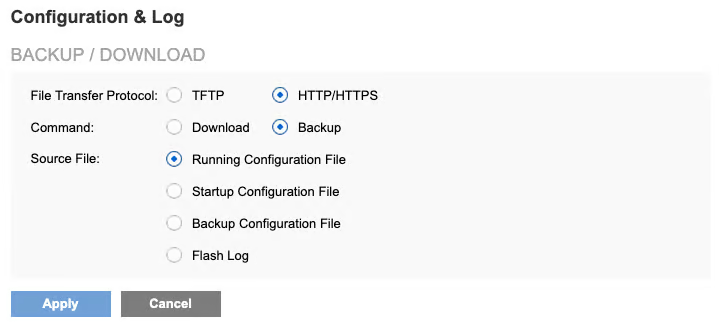
What’s the difference between running, startup, and backup configuration? The manual answers: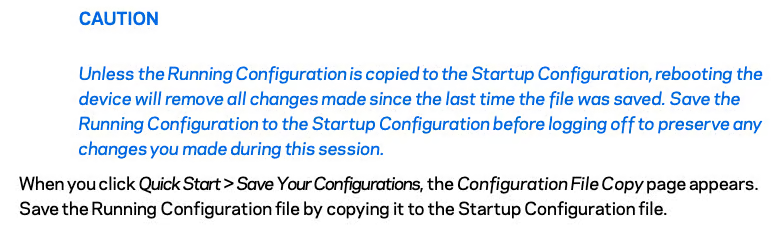
That means the settings are indeed transient if you just change them and leave the switch to its own devices. Persistent settings require explicit action.
The web UI also had a “configuration file copy” menu I could use to copy the current version of the running configuration over the startup configuration. It all survived a reboot of the switch, so I can finally sleep easy.
Lesson for system design🔗
It took me months to finally get the right idea, because things kept working well enough. Had there been a hard error from mismatching network configurations of NAS and switch, leading to loss of connection, that would have been a strong indicator that something needs fixing on the network level.
The way it actually went, the components involved tried to degrade gracefully to retain a minimum of functionality.
Noisy failure is disruptive, but a valuable signal that promotes a high-urgency response, so it should be used as a tool in a suitable situation rather than being avoided as a matter of principle.